
Your backup folder will look something like this.
Each time the plugin is executed a backup of the file being edited is saved in /<local-root-for-site>/coda_backups/2010-04-01/ or in /users/username/coda_backups/2010-04-01/ if you don’t have a local root set.
It’s like a local history for your files. If something goes bananas: just check your local backup folder.
Installation
- Download the plugin (Zip, about 10 K) or visit the GitHub repository for the latest almost Coda 2-compatible version.
- Unzip/Extract the files
- Double click
saveAndBackup.codaplugin - That’s it!
Usage
- Select Plug-ins > Save and backup
- ..or use the keyboard shortcut: Ctrl+Alt+Cmd+S
Now check your home folder. It should contain a folder called "coda_backups" with all your backups.
Use Cmd+S to run plugin
You can change the default keyboard shortcut by using the ”Keyboard Preference Pane” (in System Preferences). Go there, click the plus-sign and enter the following information:
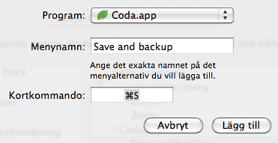
After doing this you should be able to use Cmd+S to run this plugin, resulting in lots and lots of backups! 😉
Errors…
If you get an error similar to this:
No such file or directory at /Users/<username>/Library/Application Support/Coda/Plug-ins/saveAndBackup.codaplugin/Contents/Resources/06C6E0F7-5954-493E-B0B5-49321D712980/local-backup line 63, <STDIN> line 73.
then open finder and go to your home directory and create a folder called ”coda_backups” there. Now try again and it should work.
Todo/Ideas
These are my thoughts. Contact me if you have an idea!
It would be nice to have this plugin mapped to the usual Save/Cmd+S but I don’t think this is possible yet. Hopefully in the future…- There will be a lot of files in the backup folder. Maybe a limit there…
A folder for each site would be nice too. Don’t think this is possible yet either.Kinda working now!
History
- November 20, 2009
- Files are now saved to folders based on date. Thanks to Bobbie Stump for contributing code for this.
- If a site has a local root set, files are saved to that folder.
- September 24, 2009
- Added note on how to get Cmd+S working as the keyboard shortcut. See above.
- April 15, 2009
- First version. Seems to work.
Kommentarer
17 svar till ”SaveAndBackup Coda plugin”
Hello – Thanks for dev this – I’ve been looking for this kind of thing!
But I keep running into this error:
No such file or directory at /Users/anachronistic/Library/Application Support/Coda/Plug-ins/saveAndBackup.codaplugin/Contents/Resources/06C6E0F7-5954-493E-B0B5-49321D788990/local-backup line 63, line 52.
anything I can do about this?
will your site email me if you respond?
all the best, ben
Can you check if your ”local root” is set correctly in Coda for that site? Some others have reported this and I think that was the problem for them.
Still get the same message as ben, can not set the local root, defaults to
”/Users” whenever I click to save the changes made in the Site preferences dialoque
Uninstalling Your plugin, sorry!
Just create a folder in your home directory called coda_backups that fixes the issue.
Awesome feature !
Thank you ! 😀
[…] Save and Backup, l’un des plus utile pour être sûr de ne perdre aucun fichier, en effet en reconfigurant les raccourcis clavier, il permet de faire par exemple un backup à chaque enregistrement de fichier. […]
Hello Pär
Thanks a lot for your plugin. Great great tool
Best
Grégoire
I am having the same issues as the above posters…any idea?
I am having problems with this plugin with the latest version of Coda (1.7.5) and Lion (10.7.2). It isn’t saving the file to the server when you use undo, don’t type anything and then save with your plugin. To replicate follow these steps…
1. Open a file via FTP.
2. Change the file and save.
3. View in your browser…the changes are on the server.
4. Undo (Cmd-Z) your change.
5. Save via the plugin.
6. View in your browser…the changes are NOT on the server.
I love this plugin and it has saved me more than a few times. Any help would be greatly appreciated!
Hi,
I have also some problems to save. What is meaning with “home directory”?
Is it the directory of my website lacally or did you mean the user home?
BR
Hello Pär
Thanks a lot for your plugin. One of my favourite piece-of-mind tools.
Do you think you will update it for Code 2?
I will surely miss it if not.
Let me know where I can make a donation;)
Simon
@simon: yes, I have plans to make it work with Coda 2.
If you want to donate you can do that here:
http://eskapism.se/sida/donate/
Thanks!
It would be great if we could change the backup-path. If possible in the GUI but also manually with a settings-file would be cool.
I for example would like to save the backups in my Dropbox. Because like that all backups are really safe and could be restored – also if I delete the backup files by accident.
Thanks for your work by the way. 🙂 I just donated something.
Thanks for the suggestions! I’ll see what I can do about it 🙂
Great stuff. Thx!
Don’t work anymore ?
Coda plugin is really helpful, Thank you for the installation process.